 New: AI Music Generator — create songs from lyrics
'%3e%3cg%20id='Group_17091'%20data-name='Group%2017091'%20transform='translate(53%20758)'%3e%3cpath%20id='Path_178899'%20data-name='Path%20178899'%20d='M51.713,62.718h-15.3a.7.7,0,0,1-.584-.328C33.8,59.247,33.65,53.2,33.638,52.3q0-.053,0-.106a.73.73,0,0,1,.705-.75h0a.729.729,0,0,1,.707.747c0,.005,0,.049,0,.128a3.749,3.749,0,1,0,7.489-.125.729.729,0,0,1,.707-.75h1.624a.729.729,0,0,1,.707.75,3.749,3.749,0,1,0,7.489.119c0-.075,0-.117,0-.122a.729.729,0,0,1,.707-.747h0a.73.73,0,0,1,.705.75c0,.036,0,.071,0,.106-.012.9-.167,6.943-2.186,10.086a.7.7,0,0,1-.584.328Zm0,0'%20transform='translate(-32.06%20-49.036)'%20fill='%23fff780'/%3e%3cpath%20id='Path_178900'%20data-name='Path%20178900'%20d='M265.721,51.449h0a.729.729,0,0,0-.707.747c0,.005,0,.047,0,.122a3.749,3.749,0,1,1-7.489-.119.729.729,0,0,0-.707-.75H256v11.27h7.652a.7.7,0,0,0,.584-.327c2.019-3.143,2.174-9.189,2.186-10.086,0-.035,0-.071,0-.106a.73.73,0,0,0-.706-.75Zm0,0'%20transform='translate(-244.004%20-49.037)'%20fill='%23ffc02e'/%3e%3cpath%20id='Path_178901'%20data-name='Path%20178901'%20d='M209.565,0a2.284,2.284,0,1,0,2.284,2.284A2.286,2.286,0,0,0,209.565,0Zm0,0'%20transform='translate(-197.565)'%20fill='%23ffc02e'/%3e%3cpath%20id='Path_178902'%20data-name='Path%20178902'%20d='M256,0V4.567A2.284,2.284,0,0,0,256,0Zm0,0'%20transform='translate(-244.004)'%20fill='%23ffa73b'/%3e%3cpath%20id='Path_178903'%20data-name='Path%20178903'%20d='M2.284,37.6a2.284,2.284,0,1,0,2.284,2.284A2.286,2.286,0,0,0,2.284,37.6Zm0,0'%20transform='translate(0%20-35.836)'%20fill='%23ffc02e'/%3e%3cpath%20id='Path_178904'%20data-name='Path%20178904'%20d='M416.85,37.6a2.284,2.284,0,1,0,2.284,2.284A2.286,2.286,0,0,0,416.85,37.6Zm0,0'%20transform='translate(-395.133%20-35.836)'%20fill='%23ffa73b'/%3e%3cpath%20id='Path_178905'%20data-name='Path%20178905'%20d='M93.683,270.213h-15.3a.707.707,0,0,1-.707-.707V267.4H94.39v2.108A.707.707,0,0,1,93.683,270.213Zm0,0'%20transform='translate(-74.031%20-254.213)'%20fill='%23ffc02e'/%3e%3cpath%20id='Path_178906'%20data-name='Path%20178906'%20d='M256,270.213h7.652a.707.707,0,0,0,.707-.707V267.4H256Zm0,0'%20transform='translate(-244.004%20-254.213)'%20fill='%23ffa73b'/%3e%3c/g%3e%3c/g%3e%3c/svg%3e) Upgrade Now
Upgrade NowLast week I needed a photo for a work profile. The only decent shot I had was a group picture where I was standing next to someone twice my height, wearing the wrong shirt, with terrible lighting. I couldn't use my face from another photo because my hair was completely different. That's when a friend told me about head swap.
Not face swap — head swap.
Face swap replaces your facial features. It changes your eyes, nose, and mouth while keeping everything else the same. Head swap replaces the whole thing — face, hair, head shape, the way your neck connects to your shoulders. The result doesn't look like a sticker pasted on top. It looks like the original photo was shot that way.
Try Vismz AI Head Swap — it's free, takes one click, and honestly works better than I expected.
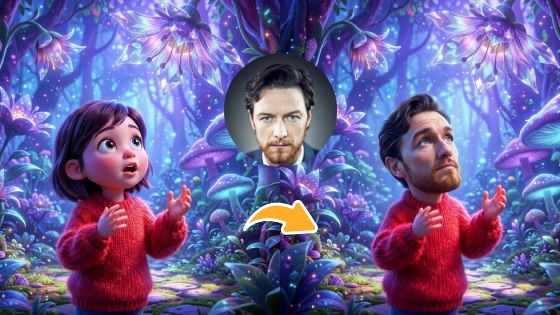
The Difference Between Head Swap and Face Swap
I keep seeing people confuse these, so here's the simplest way to think about it:
Face swap is like putting on a mask. It only changes the front of your face — eyes, nose, mouth. Hair stays the same. Head shape stays the same. If the original person has a round head and you have a narrow one, face swap won't fix that.
Head swap is more like a full cast change. Everything above the neck gets replaced — and the AI blends the edges so the skin tone, lighting, and hairline all match naturally.
I've used both, and for anything creative or dramatic, head swap wins every time. Face swap is better for subtle corrections — fixing a blink in a group photo, that kind of thing. Head swap is for when you want a complete transformation.
How It Actually Works
I won't pretend to understand every detail of the AI pipeline, but here's what happens when you click the button: the system detects the head region in both images, maps where everything is, analyzes the lighting and skin tone of both photos, then blends the replacement head — hair edges, neck contour, color matching, the works — into the original image.
You upload two photos. You click one button. That's literally it.
My First Attempt (What Worked and What Didn't)
Not every result comes out perfect on the first try. A few things I learned the hard way:
Front-facing photos work best. My first attempt used a profile shot of my target image. The AI struggled with the ear and the side of the head because it didn't have enough reference data from the front. Switched to a near-front-facing photo and the result was instantly better.
Lighting matters more than I expected. I tried swapping a head from a sunny outdoor photo onto a dim indoor shot. The AI tried to match the lighting — and it did an okay job — but the skin tones never quite aligned. When I matched two photos shot in similar light, the difference was night and day.
High-res input, high-res output. The default quality is fine for social media. But if you want to print something or use it professionally, toggle the 1080p switch. It takes a few extra seconds but the sharpness difference is noticeable.
5 Things I've Actually Used It For
1. Real Person Head Swap
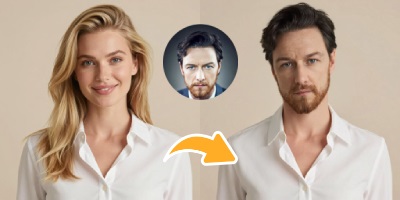
The obvious use case. Put your head on a celebrity photo, a vintage portrait, a movie still. The lighting and angle matching is what makes or breaks the realism — when it works, people won't guess it was edited.
2. Cartoon Character Head Swap

This one surprised me. I expected the AI to struggle with cartoon proportions — big eyes, exaggerated expressions — but it actually adapts your head to the cartoon style. I made an avatar for my profile picture that got more comments than any real photo of me ever did.
3. Comic Style Head Swap
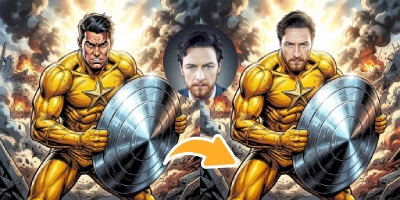
Works on manga, American comics, manhua — anything with line art and halftone patterns. I tried this on a vintage comic panel and the result genuinely looked like a character from that era. The AI picks up the art style and matches it.
4. Sketch Style Head Swap
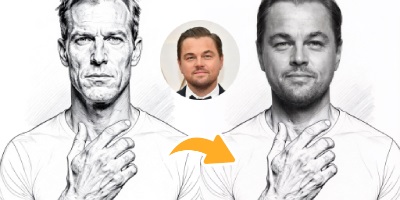
Pencil sketches and hand-drawn portraits. My favorite use: I took a sketch an artist friend made of me years ago and swapped my current face onto it. Same art style, updated me. Something poetic about that.
5. Oil Painting Head Swap
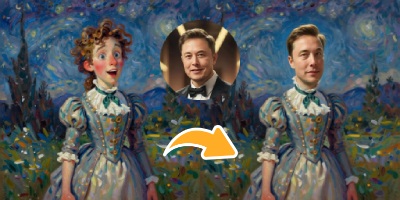
Classical paintings. The AI matches brushstroke textures and the thick, layered look of oil paint. I used Rembrandt's self-portrait as the base and the result hangs in my living room now. Well, a print of it does.
Is This Even Safe?
Fair question. Vismz says they delete all uploaded images within 48 hours and don't track or store anything beyond what's needed to process your swap. Full HTTPS, no watermarks on paid results. I've been using it for a few months and haven't had any issues, but I also wouldn't upload anything I wouldn't want on the internet — standard common sense applies to any online tool.
Should You Try It?
If you need one image edited once for a specific purpose, maybe just use Photoshop. But if you enjoy creative experimentation — making yourself a cartoon character, blending into art, creating content that gets people to stop scrolling — this is genuinely fun to use. And it costs nothing to try.
Try Vismz AI Head Swap — free to use, one click, results in seconds.

