 New: AI Music Generator — create songs from lyrics
'%3e%3cg%20id='Group_17091'%20data-name='Group%2017091'%20transform='translate(53%20758)'%3e%3cpath%20id='Path_178899'%20data-name='Path%20178899'%20d='M51.713,62.718h-15.3a.7.7,0,0,1-.584-.328C33.8,59.247,33.65,53.2,33.638,52.3q0-.053,0-.106a.73.73,0,0,1,.705-.75h0a.729.729,0,0,1,.707.747c0,.005,0,.049,0,.128a3.749,3.749,0,1,0,7.489-.125.729.729,0,0,1,.707-.75h1.624a.729.729,0,0,1,.707.75,3.749,3.749,0,1,0,7.489.119c0-.075,0-.117,0-.122a.729.729,0,0,1,.707-.747h0a.73.73,0,0,1,.705.75c0,.036,0,.071,0,.106-.012.9-.167,6.943-2.186,10.086a.7.7,0,0,1-.584.328Zm0,0'%20transform='translate(-32.06%20-49.036)'%20fill='%23fff780'/%3e%3cpath%20id='Path_178900'%20data-name='Path%20178900'%20d='M265.721,51.449h0a.729.729,0,0,0-.707.747c0,.005,0,.047,0,.122a3.749,3.749,0,1,1-7.489-.119.729.729,0,0,0-.707-.75H256v11.27h7.652a.7.7,0,0,0,.584-.327c2.019-3.143,2.174-9.189,2.186-10.086,0-.035,0-.071,0-.106a.73.73,0,0,0-.706-.75Zm0,0'%20transform='translate(-244.004%20-49.037)'%20fill='%23ffc02e'/%3e%3cpath%20id='Path_178901'%20data-name='Path%20178901'%20d='M209.565,0a2.284,2.284,0,1,0,2.284,2.284A2.286,2.286,0,0,0,209.565,0Zm0,0'%20transform='translate(-197.565)'%20fill='%23ffc02e'/%3e%3cpath%20id='Path_178902'%20data-name='Path%20178902'%20d='M256,0V4.567A2.284,2.284,0,0,0,256,0Zm0,0'%20transform='translate(-244.004)'%20fill='%23ffa73b'/%3e%3cpath%20id='Path_178903'%20data-name='Path%20178903'%20d='M2.284,37.6a2.284,2.284,0,1,0,2.284,2.284A2.286,2.286,0,0,0,2.284,37.6Zm0,0'%20transform='translate(0%20-35.836)'%20fill='%23ffc02e'/%3e%3cpath%20id='Path_178904'%20data-name='Path%20178904'%20d='M416.85,37.6a2.284,2.284,0,1,0,2.284,2.284A2.286,2.286,0,0,0,416.85,37.6Zm0,0'%20transform='translate(-395.133%20-35.836)'%20fill='%23ffa73b'/%3e%3cpath%20id='Path_178905'%20data-name='Path%20178905'%20d='M93.683,270.213h-15.3a.707.707,0,0,1-.707-.707V267.4H94.39v2.108A.707.707,0,0,1,93.683,270.213Zm0,0'%20transform='translate(-74.031%20-254.213)'%20fill='%23ffc02e'/%3e%3cpath%20id='Path_178906'%20data-name='Path%20178906'%20d='M256,270.213h7.652a.707.707,0,0,0,.707-.707V267.4H256Zm0,0'%20transform='translate(-244.004%20-254.213)'%20fill='%23ffa73b'/%3e%3c/g%3e%3c/g%3e%3c/svg%3e) Upgrade Now
Upgrade NowI bought a suit online last month. Looked great on the model. Arrived, tried it on, looked like I was wearing my dad's clothes. Returned it, ordered another size, waited another week. Two weeks and two shipping fees later, I finally had something that fit.
Then I tried the same thing with Vismz AI Clothes Changer — uploaded a photo, picked a similar suit, and saw how it'd actually look on me in about ten seconds. If I'd done that first, I would have ordered the right size the first time.
What the AI Actually Does (In Plain English)
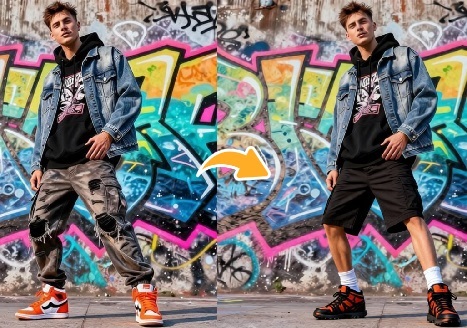
You give it a photo of yourself and a garment — either from the built-in wardrobe or something you upload. The AI figures out your body shape, pose, and posture, then drapes the clothing onto you with realistic folds, lighting, and fabric texture. Your skin tone stays the same, your background stays the same, and the result looks like you actually put the outfit on for a photo.
It's not a Photoshop cut-and-paste job. The AI is mapping the clothing onto your body in 3D space — it understands where fabric should bunch, how light should fall, and where shadows should sit. That's the difference between a convincing result and something that looks like a bad collage.
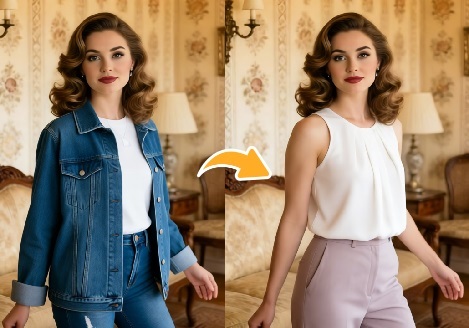
You can target specific zones too. Just want to try a new jacket while keeping your jeans? Upper body only. Shopping for pants? Lower body. A dress changes everything — full outfit. The tool adapts.
How to Actually Get a Good Result
The process is straightforward, but a few things make the difference between "that's impressive" and "that's clearly fake."
Upload a clear photo. Full-body or three-quarter shots, front-facing, good lighting. The AI needs to see your body clearly to map the clothing correctly. A photo where you're hunched over, arms crossed, or standing in a dark hallway will confuse it.
Pick your outfit. Browse the built-in wardrobe organized by style — tops, dresses, suits, casual, formal — or upload your own garment image. If you're uploading, use a clean flat-lay or mannequin shot where the full garment is visible. A crumpled shirt in a ball won't work. I learned that the hard way.
Choose the zone. Upper body, lower body, or full outfit. This is what lets you mix and match — keep your own jeans while trying a new blazer, for example.
Use the prompt. Not required, but it helps. "Make the fabric silk with a slight sheen" or "Tuck the shirt in and add a belt" — small details like that push the output from decent to convincing. I usually skip it for quick tests, but always use it for anything I'm actually going to show someone.
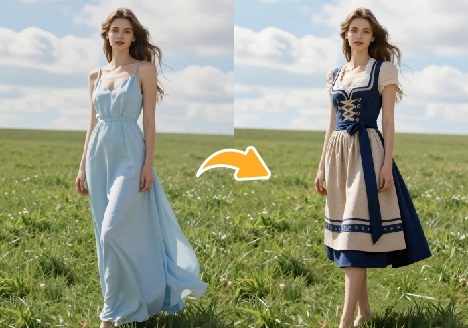
Generate. Results come back in seconds. Free account gives you a watermark-free download with 30 credits to start.
When It Works and When It Doesn't
Front-facing photos in good, even lighting produce the best results. Well-lit full-body shots with a simple background are ideal — the AI gets more detail and the clothing maps more naturally.
What trips it up: dim lighting where the AI can't read body contours, baggy or heavily layered clothing in the original photo that obscures your actual shape, and garment uploads that are wrinkled or partially cropped. If you look like a silhouette in your photo, the AI doesn't have enough to work with.
Also: the AI does fabric texture surprisingly well — cotton, denim, silk all look distinct. But very detailed patterns (plaid, intricate florals) can get slightly distorted, especially around the edges where clothing meets the background. For most use cases it's not noticeable, but if you're evaluating a garment for purchase based on its exact pattern, the AI version won't be pixel-perfect.
What People Actually Use It For
I started using this for online shopping decisions — figuring out whether something would look right before adding to cart. Saves me the return cycle and shipping costs, which adds up fast.
A friend who runs a small clothing brand uses it to show products on different body types without booking multiple model shoots. She uploads a garment once, maps it onto a few preset body types, and gets her product photos in minutes instead of weeks.
Others use it for outfit planning — what to wear to a wedding, how to style a vacation capsule wardrobe, whether those two pieces actually go together. It's faster than trying on twenty combinations in front of a mirror.
And honestly? Sometimes you just want to see yourself in a ridiculous outfit for the group chat. The tool works for that too.
Bottom Line
This isn't going to replace trying on clothes in person — nothing fully replaces the feel of fabric on your skin. But for narrowing down options before you buy, for planning outfits without pulling everything out of your closet, and for seeing how something drapes on your actual body instead of a model three sizes different from you, it's surprisingly useful.
Try Vismz AI Clothes Changer — upload a photo, pick an outfit, see it on you in seconds. Free to preview, no sign-up needed.

